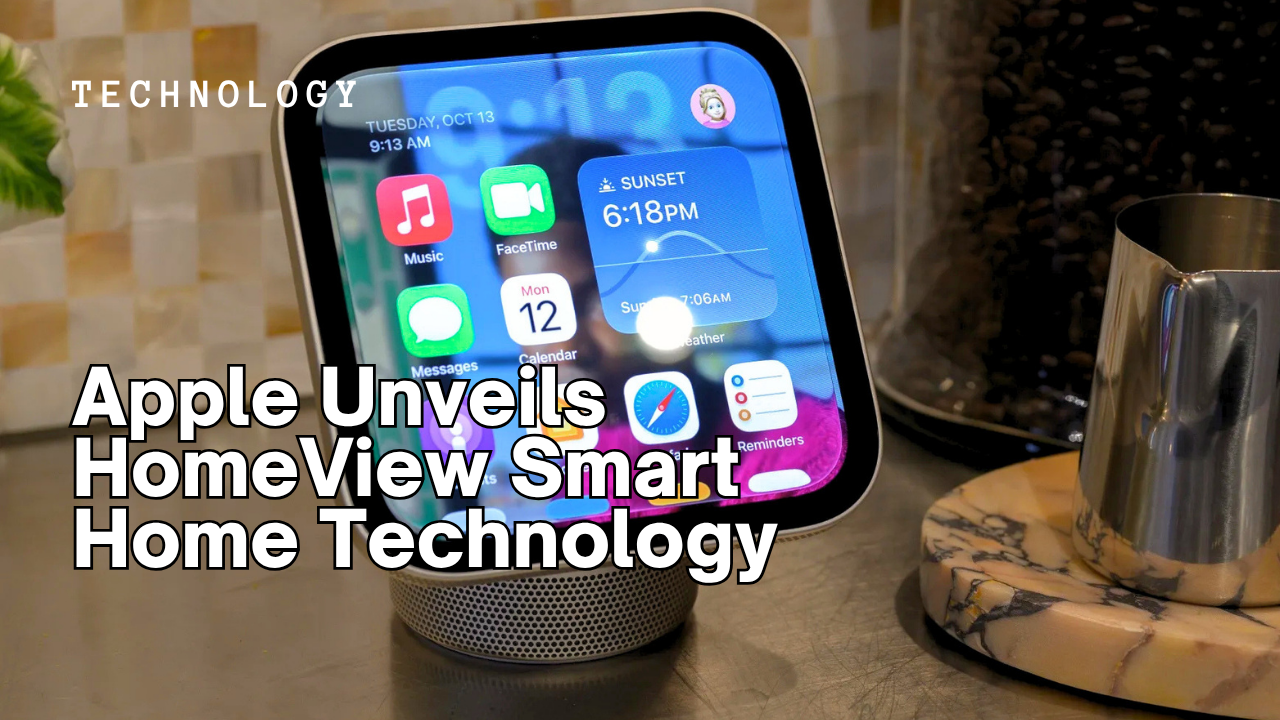
Apple HomeView is a newly unveiled software and hardware ecosystem designed to act as a centralized, intelligent command center for the modern smart home. By unifying disparate devices under a single, highly visual interface that leverages advanced spatial computing and AI, this technology represents Apple’s most aggressive move to dominate home automation and user privacy in the connected household.
Key Takeaways
- Visual-First Control: HomeView replaces text-heavy menus with a 3D digital twin of your actual living space.
- Enhanced Security: All video processing and behavioral analysis happen on-device, maintaining Apple’s strict privacy standards.
- Unified Hardware: The release includes a new dedicated HomeView Wall Display and significant updates to existing Apple technology.
- Predictive Automation: Utilizing the M4 chip architecture, the system learns your habits to suggest lighting and climate adjustments before you ask.
What is Apple HomeView?
Apple HomeView is the next evolution of the HomeKit framework, transforming the way we interact with our physical surroundings through a sophisticated digital layer. For years, users have complained that smart home apps feel like glorified spreadsheets, full of toggles and sliders that are difficult to navigate when you just want to turn off a specific lamp. Apple has addressed this by creating a platform that prioritizes spatial awareness, allowing you to see a rendered version of your home on your iPhone, iPad, or the new dedicated wall-mounted display.
According to the official Apple HomeView announcement, this system isn’t just about pretty graphics; it is a fundamental shift in how home automation is managed. I have seen countless “smart” systems fail because they were too complex for the average family member to use. HomeView aims to solve this by making the interface so intuitive that a child or a houseguest can understand it immediately. If you can point at a room on a screen, you can control everything in it.
We have reached a point in 2026 where the “Internet of Things” (IoT) has become cluttered. We have smart fridges, smart blinds, and even smart coffee machines that consume massive amounts of data. HomeView acts as the filter for this noise. It prioritizes the devices you use most and hides the technical complexity behind a sleek, glass-morphic design language that is synonymous with Apple technology.
The primary goal of HomeView is to reduce the friction of living in a connected environment by providing a “God-view” of your domestic life.
How Apple HomeView Technology Works
The magic behind Apple HomeView lies in its use of LiDAR (Light Detection and Ranging) and the company’s proprietary “RoomSense” algorithm. When you first set up the system, you use your iPhone Pro or iPad Pro to scan your rooms. The device creates a highly accurate 3D floor plan, identifying the location of every Matter-enabled light bulb, smart plug, and thermostat. This isn’t just a static map; it’s a living document that updates as you add new equipment.
Under the hood, the system is powered by Apple’s silicon. The heavy lifting of rendering the 3D environment and processing localized AI triggers is handled by the Home Hub, which can be an Apple TV 4K or a HomePod. By keeping the “intelligence” inside your four walls, Apple ensures that your movements aren’t being uploaded to a server for analysis. This localized approach is what sets Apple technology apart from competitors who rely heavily on cloud-based processing.
Communication between devices happens over the Thread protocol, ensuring that the mesh network is stable and responsive. Have you ever walked into a dark room, asked Siri to turn on the lights, and waited three seconds for a response? HomeView virtually eliminates that latency. Because the system knows exactly where you are relative to your devices, it can even use “Ultra-Wideband” (UWB) to activate lights as you approach them, without needing a formal voice command or a physical button press.
New Apple Features and Hardware Capabilities
While the software is the star of the show, Apple has also introduced a specialized hardware component: the HomeView Command Center. This is a 15-inch, ultra-thin touch display designed to be mounted on a kitchen wall or placed on a charging stand in the living room. It features a simplified version of the HomeView interface that is always on, acting as a digital hearth for the household.
- Dynamic Room Toggles: Tap a room on the 3D map to instantly see its temperature, air quality, and lighting status.
- Multi-User FaceID: The wall display recognizes who is standing in front of it and adjusts the “Favorites” and “Shortcuts” accordingly.
- Energy Insights: A new dashboard that shows real-time power consumption, helping users identify “vampire” appliances that are wasting electricity.
- Predictive Scents: Integration with high-end smart diffusers to match the home’s “atmosphere” to the time of day or scheduled events.
The energy insights feature is particularly timely. With rising utility costs, being able to see that your old refrigerator is spiking in energy usage at 3 AM is invaluable. Many users find that once they can visualize their energy waste, they are much more likely to invest in eco-conscious home essentials to lower their carbon footprint. New Apple features like “Adaptive Energy” can even delay your dishwasher’s start time to a window when electricity rates are lowest.
What is the HomeView 3D Digital Twin?
The 3D Digital Twin is a real-time, interactive replica of your home’s interior that serves as the primary interface for Apple HomeView. Instead of scrolling through a list of device names like “Living Room Lamp 2,” users interact with a visual representation of that lamp within a virtual model of their room. This feature utilizes LiDAR data to ensure the scale and placement of objects are accurate, providing a “spatial” way to manage home automation that feels more natural than traditional apps.
Privacy and Data Security in Home Automation
Privacy is the cornerstone of the Apple HomeView pitch. In an era where reports of smart TVs logging audio data without consent are becoming common, Apple is leaning hard into its “Privacy. That’s iPhone” mantra. Every piece of data generated by HomeView, from your floor plan to the exact time you wake up, is encrypted with a key that only your devices hold.
One of the more nuanced features is “Guest Access Tiers.” In the past, giving a houseguest control over your smart home often meant giving them full access to your network. With HomeView, you can air-drop a temporary “Home Pass” that only allows them to control specific devices, like the guest room lights or the media center, for a set duration. Once they leave your geofence, the access automatically expires.
Furthermore, Apple has introduced “Secure Video+.”: This feature uses on-device AI to distinguish between people, pets, and even specific family members. Instead of sending a video clip to the cloud to see who is at the door, your Home Hub identifies the person locally and simply sends a notification saying “Sarah is home.” This minimizes the amount of sensitive video data that ever leaves your premises. Trustworthiness in smart home tech isn’t just about the hardware working; it’s about knowing your private life isn’t being harvested for ad targeting.
HomeView vs. Traditional HomeKit
It is important to distinguish between the classic Home app and the new HomeView experience. While HomeKit is the underlying “language” that allows devices to talk to each other, HomeView is the “eyes” and “brain” of the operation. Think of it as the difference between a command-line interface and a modern operating system like macOS.
| Feature | Classic Home App | Apple HomeView |
|---|---|---|
| Interface | Tile-based List | 3D Spatial Map |
| Intelligence | Manual Automations | Predictive AI (M4) |
| Scanning | Manual Entry | LiDAR RoomScan |
| Privacy | Cloud/Local Mix | 100% Local Processing |
The trade-off here is hardware requirement. While the classic Home app runs on almost any iPhone from the last five years, HomeView requires at least an A17 Pro chip or newer to handle the 3D rendering smoothly. This means if you are holding onto an older device, you might be locked out of the most immersive features until you upgrade. However, the core home automation benefits, such as Matter 2.0 support, remain accessible across the ecosystem.
How to Set Up Your HomeView System
Setting up HomeView is designed to be a “Saturday morning project” rather than a week-long headache. You start by updating your devices to the latest OS version released in early 2026. Once updated, a “HomeView Setup” prompt will appear when you open the Home app. The system will guide you through the process of scanning your home using your phone’s camera.
I recommend starting with one room, perhaps your home office or bedroom, to get a feel for the spatial controls. You can drag and drop virtual icons onto your real-world furniture. For instance, if you have a smart bulb in a desk lamp, you place the light icon exactly where that lamp sits in your 3D model. This precision is what makes the interface feel so magical; when you tap the virtual lamp, the real one responds instantly.
For those working from home, integrating HomeView with your workstation can significantly boost efficiency. You can set a “Focus Scene” that not only dims the lights but also integrates with your ergonomic keyboard and mouse setup by adjusting your standing desk height via a smart controller. The beauty of Apple technology is its ability to create a cohesive environment that supports your physical health and productivity.
If you encounter issues during the LiDAR scan, ensure that your rooms are well-lit and that you have removed any significant clutter. The AI is good, but it can sometimes mistake a pile of laundry for a piece of furniture. Once the map is finalized, you can share it with other family members, who will see the same 3D model on their own devices.
Apple’s entry into spatial home management is a clear sign that the company believes the future of computing isn’t just on our screens, but in the spaces we inhabit. By combining high-end Apple technology with a user-friendly interface, they are making a compelling case for why your next home upgrade should be digital. While the initial cost of compatible hardware might be a barrier for some, the long-term benefits of privacy, energy savings, and sheer convenience are hard to ignore.
As we look further into 2026, expect to see more third-party manufacturers rushing to gain the “HomeView Certified” badge. This will ensure that their products don’t just “work” with Apple, but actually appear correctly in the 3D space with accurate models and textures. The smart home is finally becoming less about the “smart” and more about the “home.”
Sources
- Apple, Official HomeView Technology Overview
- The Verge, Analysis of Apple’s Spatial Computing Expansion
- TechCrunch, Understanding Matter 2.0 and HomeView Integration
Frequently Asked Questions
Does Apple HomeView require a subscription?
No, the core features of HomeView are included with your Apple hardware. However, some advanced features like 30-day “Secure Video+” history still require an iCloud+ subscription plan, similar to the previous HomeKit Secure Video requirements. Most users will find the standard features more than adequate for daily home management.
Can I use HomeView with non-Apple smart devices?
Yes, HomeView is fully compatible with the Matter standard. This means as long as your smart plugs, lights, or locks are Matter-certified, they will appear and function within the HomeView interface. Apple has made a significant effort to ensure that the home automation ecosystem remains open to diverse hardware manufacturers.
Do I need to buy the new Wall Display to use HomeView?
The HomeView Command Center is an optional piece of hardware. You can access the full HomeView 3D interface on any compatible iPhone, iPad, or Mac. The Wall Display is simply a dedicated device for those who want a permanent, centralized hub for family use without needing to carry a personal device around.
How does HomeView handle multiple floors in a house?
During the initial LiDAR setup, the system prompts you to scan each floor separately. In the interface, you can “stack” or “peel away” floors using a simple gesture, allowing you to manage a multi-story home with the same ease as a small apartment. The transition between floors is seamless and maintains the 3D spatial accuracy.
Is HomeView secure against hackers?
Apple uses end-to-end encryption for all HomeView data and processes AI locally on your Home Hub. This significantly reduces the attack surface compared to cloud-reliant systems. While no system is 100% invincible, Apple’s architectural choices make HomeView one of the most secure smart home platforms currently available to consumers.

TRENDING: Google Unveils Gemini 4 Argon AI Model
Download the new game Guess The Celebrity Quiz and check how well you know your idols
Always be up to date with the news and follow the trends!
 Support our work by giving us a small donation
 Support our work by giving us a